
Best Pomodoro Chrome Extension That Actually Locks
Most Pomodoro Chrome extensions are countdown timers — they notify but don't enforce. Here's a Pomodoro Chrome extension that locks the browser to your task.
 CollinFounder, OneTabFocus10 min read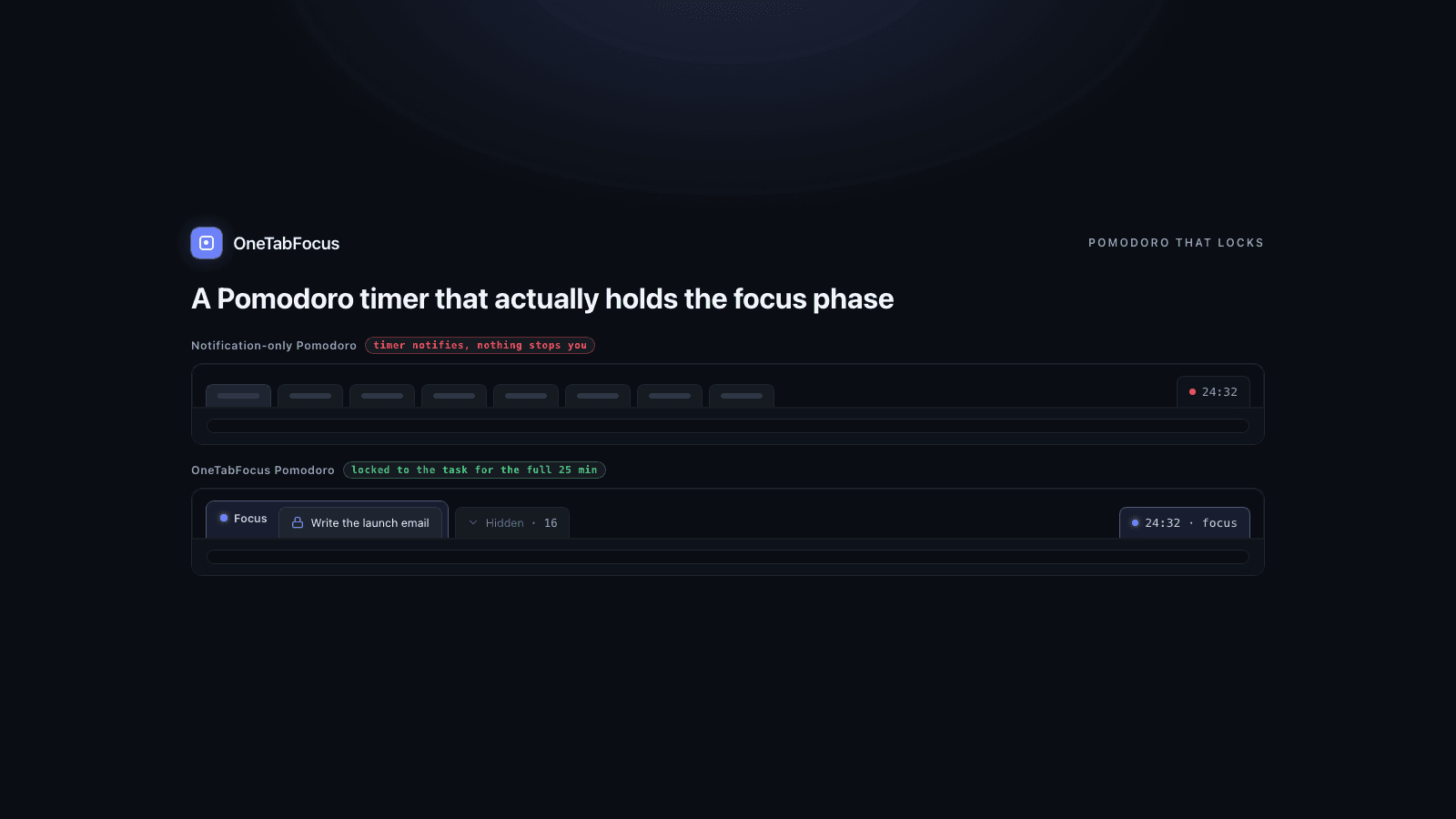
On this page
- Why most Pomodoro Chrome extensions don't work
- What "actually locks" means
- The Pomodoro Chrome extensions, by what they actually do
- 1. Marinara: Pomodoro Assistant — pure notification timer (most installed)
- 2. Pomodoro Chrome Extension — minimal notification timer
- 3. Focus To-Do — task manager + Pomodoro hybrid
- 4. Forest — gamified Pomodoro with tree-killing
- 5. Otto — Pomodoro + site blocklist
- 6. OneTabFocus — Pomodoro with browser lock
- How to pick the right Pomodoro extension for you
- How OneTabFocus does Pomodoro differently
Why most Pomodoro Chrome extensions don't work
The Pomodoro Technique is simple: 25 minutes of focused work, then a five-minute break. After four cycles, take a longer 15- to 30-minute break. The technique is well-studied — what's missing in Chrome is a Pomodoro mode that actually enforces the 25 minutes. A 2026 Brown Daily Herald fact-check of the research base found students using systematic break-taking techniques reported being more concentrated and motivated than peers choosing their own break schedule, and the technique specifically reduces procrastination by converting a vague task into a concrete 25-minute commitment.
The technique works. The Chrome extensions that implement it mostly don't.
Almost every Pomodoro Chrome extension in the Chrome Web Store is a notification timer. You click start, a countdown begins, the toolbar icon shows the remaining minutes, and at the end of 25 minutes a sound plays and a notification appears. That is the whole intervention. Nothing prevents you from opening a new tab during the 25 minutes. Nothing prevents you from jumping to Twitter "just to check," realising twenty minutes later that the Pomodoro timer is still running, and feeling worse about it than if you'd never started. Gloria Mark's research at UC Irvine puts the average recovery time after a single interruption at 23 minutes and 15 seconds — which means losing the focus phase to one tab switch typically costs you the whole Pomodoro. A timer that just notifies is leaving the entire enforcement layer to your willpower.
This is what an honest Pomodoro Chrome extension needs to fix. The post compares the six options that actually exist and explains where the gap is.
What "actually locks" means
Pomodoro Chrome extensions fall into three categories by how much enforcement they provide.
Notification timer. The most common pattern. A countdown runs, the timer notifies you at the start and end of each phase, and nothing else happens. Marinara, the official Pomodoro Chrome Extension, Simple Pomodoro, Lofidoro, and most niche entries are in this category. They are the simplest to install and the easiest to ignore.
Timer plus site blocklist. A small set of extensions pair a Pomodoro timer with a list of distracting sites that get blocked during the focus phase. Otto and Habitica Pomodoro are the main examples. This works if your problem is a named distraction (Twitter, Reddit, news) but it doesn't help when the distraction is jumping from your code editor to Linear to Notion to your draft — none of those are on a blocklist, but each is a focus-phase-killer.
Timer plus browser lock. A Pomodoro that locks the browser to your task tab for the focus phase, without needing you to enumerate distracting sites in advance. This is the category OneTabFocus is in, and as of May 2026 it is the only Chrome extension we have found that does this well. The lock also has to hold through the break — otherwise a five-minute break becomes a return to distraction, and the rhythm is broken.
The third category is what most "I keep failing at Pomodoro" complaints actually need. The first two leave too much to discipline.
The Pomodoro Chrome extensions, by what they actually do
1. Marinara: Pomodoro Assistant — pure notification timer (most installed)
Marinara is the most-installed dedicated Pomodoro extension in the Chrome Web Store and is genuinely well-made. It is open-source, maintained, and explicitly does not collect user data. Features include customisable focus and break durations, 20+ notification sounds, optional ticking, history and statistics, and export/import. The visual interface is clean and unobtrusive.
What it does not do: prevent you from switching tabs during the focus phase. The timer runs in the background and notifies you when the phase ends. Everything else is on you. For users who already have the discipline to stay in the focus phase, Marinara is the cleanest tool in the category. For the people most likely to be searching for "best Pomodoro Chrome extension," that's the problem.
2. Pomodoro Chrome Extension — minimal notification timer
The official-style "Pomodoro Chrome Extension" (4.6 stars on the Chrome Web Store) is the minimalist version of Marinara: a simple timer interface, no registration required, minimal permissions, no data storage. Same notification-only mechanic as Marinara but with less customisation and a smaller feature set.
Good for: users who want a single-purpose timer with no setup and no upsell. Not good for: anyone whose problem is the focus phase itself rather than knowing when to start and stop.
3. Focus To-Do — task manager + Pomodoro hybrid
Focus To-Do is the strongest task-manager-plus-Pomodoro hybrid in the category. The Chrome extension is free with a premium tier at $2.99/month, $8.99/year, or an $11.99 lifetime upgrade. Premium adds cloud sync across devices, deeper statistics, and cloud backup. The killer feature is the timer's ability to log focused minutes against specific tasks, so you can see at the end of the week how much time you spent on each project.
What it does not do: enforce the focus phase. Like Marinara, Focus To-Do is a notification timer with task-management bolted on. If you can stay in the focus phase, the per-task time tracking is valuable. If you can't, the tracking shows you exactly how much time you lost to tab-switching, which is informative but does not fix the problem.
4. Forest — gamified Pomodoro with tree-killing
Forest is a Pomodoro timer with a virtual tree that grows during the session and dies if you leave the focus mode. $1.99 one-time, with premium add-ons. The company plants real trees through a reforestation partner when users hit virtual-tree milestones. One of the only Pomodoro extensions with a real mobile/cross-device story.
The enforcement is guilt-based, not technical. If you really want to switch tabs, Forest does not stop you — it just kills the tree and notes the failure. For users who respond to gamification, this is enough. For ADHD users or anyone with strong novelty-seeking pull, the tree is not enough; the brain decides the tree is acceptable collateral.
5. Otto — Pomodoro + site blocklist
Otto is one of the only Chrome extensions that pairs a Pomodoro timer with a real site blocklist, both completely free. During a focus session, sites on your blocklist are inaccessible until the session ends. The blocklist is yours to configure.
This is the strongest enforcement in the notification-or-blocklist category, and for a lot of users it is enough. The limit is the limit of any blocklist: it only works for distractions you have explicitly named, and it does not help when the distraction is your own working tabs. If your problem is "I keep jumping from VS Code to Linear during the focus phase," blocking Twitter and Reddit doesn't intervene.
6. OneTabFocus — Pomodoro with browser lock
This is us. OneTabFocus is a Chrome extension that locks the browser to one tab — or a small set of reference tabs — for a chosen duration, and the Pomodoro mode runs that lock as configurable focus and break cycles. The lock holds through the break, so the break does not become a return to distraction. The focus phase resumes automatically. Free tier includes Pomodoro mode for the trial period; after that, Pomodoro is part of Pro ($24/yr, or $39 Founders Lifetime for 12 months after launch).
What it does that the others do not: enforces the focus phase at the browser level without requiring you to maintain a blocklist. Your focus tab is the only thing reachable; your reference tabs (Notion, Linear, docs) are reachable if you include them in the focus group; everything else is collapsed into a single grey "Hidden" chip and out of reach until the Pomodoro cycle completes.
Where it is not the right choice: if you want a simple notification timer with no setup and no opinion about the focus phase, install Marinara. We are the heavier intervention; that is the point.
How to pick the right Pomodoro extension for you
The six extensions solve different versions of the Pomodoro problem.
- You already have the discipline to stay focused; you just want a clean countdown. → Install Marinara or Pomodoro Chrome Extension. Both are free, both work.
- You want to track time-per-task across multiple projects. → Install Focus To-Do. Premium is worth the $2.99/month if you log work for clients.
- You respond to gamification and want a low-friction Pomodoro on mobile too. → Install Forest. $1.99 one-time.
- Your distractions are named sites (Twitter, Reddit, news). → Install Otto. Free, integrates the blocklist into the Pomodoro phases.
- Your distractions are your own working tabs during the focus phase, or you want the break to actually be a break. → Install OneTabFocus. Free to install with a Pro tier for the Pomodoro mode and longer sessions.
How OneTabFocus does Pomodoro differently
OneTabFocus collapses every non-focus tab into a single 'Hidden' chip. Tabs are not closed: audio keeps playing, drafts are preserved, scroll position is preserved.
Pomodoro mode runs configurable focus and break cycles. The lock holds through breaks — you get a pause screen, not a return to distraction. The focus phase resumes automatically.
The two together are the difference. A notification-only timer asks willpower to do the work of staying in the focus phase; a timer plus blocklist works for named sites but fails when the distraction is your own work tabs; the lock plus held-through-break combination is what lets the rhythm actually hold for the full four-Pomodoro cycle most people are trying to do. For the full mechanics of the lock, see the Pomodoro page or the tab-lock page. Otherwise, install OneTabFocus and run one Pomodoro cycle on whatever you have been trying to ship.
FAQ
What is the best Pomodoro Chrome extension?
Marinara is the most-installed pure timer; Focus To-Do is the strongest task-manager hybrid. If your problem is staying in the focus phase without switching tabs, neither helps — both are notification-only. For real enforcement, install OneTabFocus, which locks the browser to your task and holds the lock through Pomodoro breaks so a five-minute break stays five minutes.
Does Pomodoro actually work?
Yes, with caveats. A 2026 Brown Daily Herald fact-check of the research found students using systematic break-taking techniques like Pomodoro reported being more concentrated and motivated than peers choosing their own schedule, and the technique specifically reduces procrastination. The catch is that Pomodoro only works if you actually stay in the focus phase. A notification-only timer leaves that to willpower.
How long should Pomodoro focus sessions be?
The classic interval is 25 minutes of focus followed by a five-minute break, with a longer 15- to 30-minute break after four cycles. The 25-minute number is not magic — it is short enough for most people to commit to starting, which is the actual hard part. Stretch longer cycles only once 25 minutes feels easy to complete repeatedly.
Can a Chrome extension block tabs during Pomodoro?
Yes — two patterns exist. One is a Pomodoro timer plus a site blocklist (Otto, Habitica) that blocks named distracting sites during focus. The other is a Pomodoro timer plus a full browser lock (OneTabFocus) that locks the browser to your task tab without a blocklist. The lock approach is stronger when the distraction is your own work tabs.